Your teammate's Claude now shows up next to your code
cc-connect now ships as a VSCode extension. The peer chat and the embedded Claude live in a panel next to your code. Here are the four design calls that shaped it — most of them about what we didn't re-build.
TL;DR
- Last post shipped cc-connect: a peer-to-peer chat room where each person’s Claude Code reads the same log. You bring your own AI; the substrate is shared. It worked, but the chat lived in a terminal window and the code lived in an editor — the human ended up being the courier.
- New: the substrate now ships as a VSCode extension. Activity Bar → Rooms sidebar → bottom-panel webview with peer chat on one side and the embedded Claude on the other. The CLI and TUI are still first-class; the extension is another client of the same Substrate.
- The interesting design calls aren’t UI choices — they’re “what does the editor not re-implement.” We use the Claude Agent SDK for subprocess plumbing, per-turn
--printwith a stable session-id for clean Cursors, a strict webview CSP because peer chat is untrusted content, and inline approval bubbles that live entirely on the SDK’scanUseToolcallback. - Pre-Marketplace. Ships as a tarball + bootstrap script (no Rust required); Marketplace + Open VSX come once the v0 surface stabilizes.
cc-connect lives at Minara-AI/cc-connect. The extension is the new top-level vscode-extension/ directory.
Where we left off
The previous post shipped the substrate: a peer-to-peer chat room over iroh-gossip, plus a UserPromptSubmit hook that reads the room’s local log and prepends unread peer messages to your Claude’s next prompt. Two CLI commands. Worked.
The most consistent feedback I got afterwards was a tab-switch problem. The chat room lived in a terminal pane; the work lived in an editor; and the human was the courier between them. You’d see a peer’s Claude propose an edit, Cmd-Tab into your editor to react, Cmd-Tab back to read the next message. The substrate was shared but the surface was split.
The fix in retrospect is the obvious one: stop being the courier. Move the chat into the editor where the code already is.
What the extension is
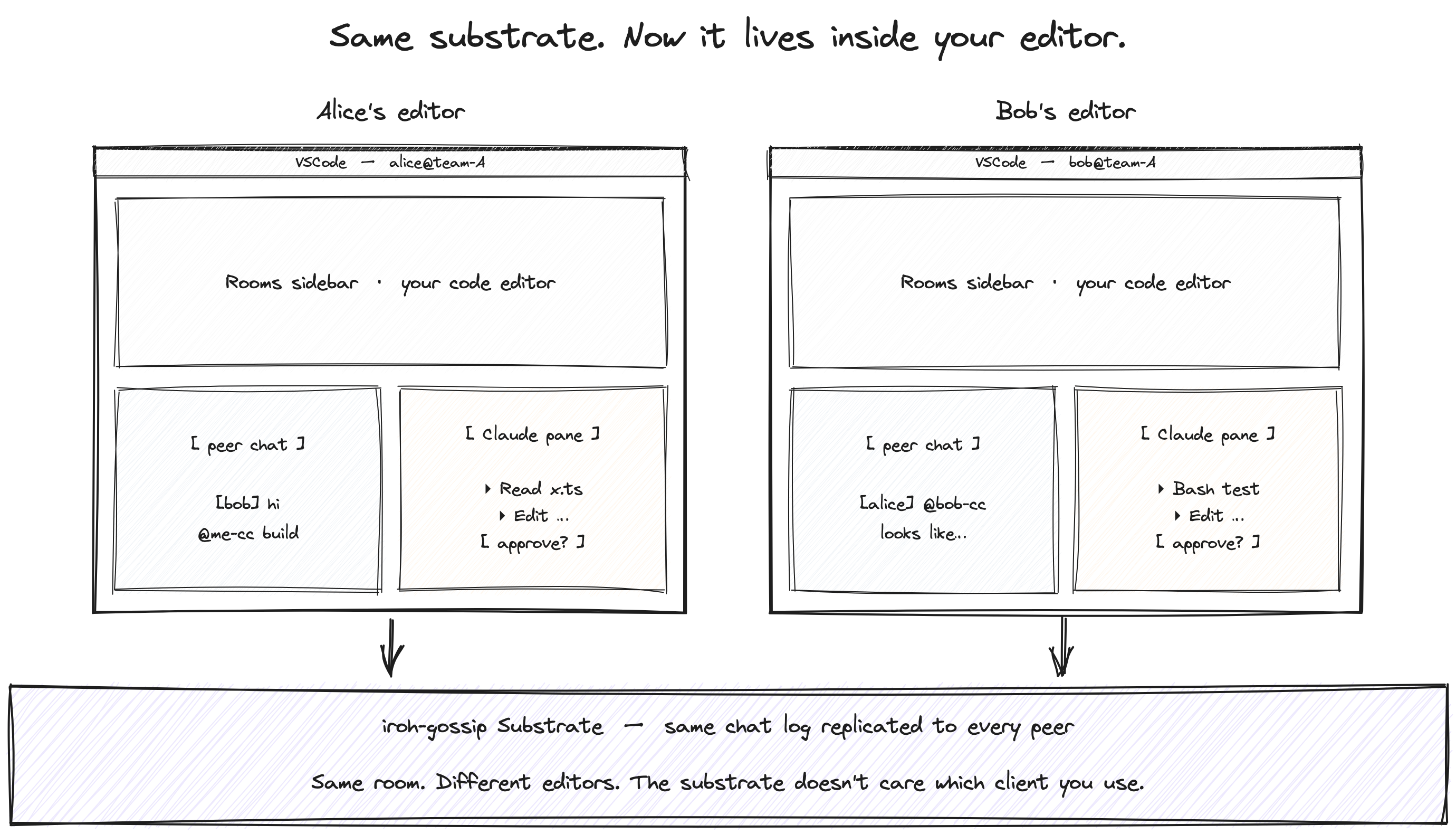
There’s an Activity Bar entry on the left for cc-connect. Click it and the Rooms sidebar lists every Room you’ve ever joined, with a live indicator next to the ones whose host-bg daemon is currently up. Open one and a webview takes the bottom panel: peer-to-peer chat on the left (your messages right-aligned in iMessage-style bubbles, peers left-aligned, mentions highlighted), the embedded Claude on the right (step timeline, tool-use cards, inline permission bubbles, slash-command launcher, file-attach button).
Same host-bg daemon underneath. Same chat.sock, same log.jsonl. The extension is just another client of the same Substrate — the CLI still works, the TUI still works, you can mix surfaces across machines without anyone noticing.
Four decisions worth naming
I’ll skip the UI tour. What I’d want to read in someone else’s “we shipped a VSCode extension” post is the load-bearing decisions, especially the ones about what we didn’t build.
1. The Claude Agent SDK does the subprocess plumbing
@anthropic-ai/claude-agent-sdk exposes query(), which spawns the user’s installed claude binary, parses stream-json, threads hook lifecycle events into the same typed event stream, supports cooperative abort via AbortController, and accepts an in-memory MCP server config. The extension calls it; the SDK does the rest.
This is genuinely load-bearing. A homegrown spawn-and-parse layer is a few hundred lines of TS and a permanent maintenance burden every time Claude Code’s stream-json shape evolves. Using the SDK as a normal npm dep means future Claude Code releases don’t immediately break us, and we get a typed AsyncGenerator<SDKMessage> for free — including the hook lifecycle events, which the Claude pane renders directly.
(License note: the SDK is under Anthropic Commercial Terms. We use it as a runtime dependency, the same pattern as @anthropic-ai/sdk in OSS projects. No SDK source is redistributed. The extension itself stays MIT/Apache.)
2. Per-turn --print, stable --session-id per Room view
The MCP tool cc_wait_for_mention was always meant for long-running CLI/TUI sessions: claude is alive, polls the log, fires when mentioned. In the extension we do the opposite — the extension watches the log; on @<my-nick>-cc <body> it spawns a fresh claude --print --session-id <UUID> process with the body as the user prompt. The hook fires, injects unread chat, Claude responds, the process exits.
The trick is the stable session-id. The Cursor (the per-(Room, Session) marker that says “Alice’s Claude has read up through message N”) is keyed off session_id in the hook stdin payload. We thread the same UUID across every spawn within one Room view’s lifetime. End-to-end verification was the most reassuring smoke-test in this whole project: the UUID flows through the SDK, into the spawned claude, into the hook payload, into the Cursor file, byte-for-byte. The cache stays warm across turns; the unread window stays correct; we never rebuild any of that.
Closing the Room view = new session next time = fresh Cursor + injected backfill. That isn’t a bug, that’s the contract.
3. The webview is a strict sandbox
The webview’s CSP is default-src 'none'; script-src ${webview.cspSource}; style-src ${webview.cspSource} 'unsafe-inline'. No remote origins. No unsafe-inline for scripts. Peer chat bodies render as text nodes — never innerHTML. Mention highlighting is whitelist-only.
The reason isn’t paranoia; it’s the threat model from day one. Peer chat is untrusted content (the original SECURITY.md already says so, and the orientation preamble flags it that way to the AI), and a webview has no business reading chat.sock or log.jsonl directly. All Substrate I/O goes through the extension host process; the host re-emits everything as typed postMessage events. The webview is a sandbox, not a participant.
This shows up in concrete decisions across the code: the host parses the daemon’s outputs, the webview never opens a socket, file drops go through the host’s vscode.window.showOpenDialog rather than HTML’s <input type="file">.
4. Inline permission approval rides on the SDK’s canUseTool
The SDK already exposes a canUseTool(toolName, input) callback, awaited by the SDK before any tool runs. We didn’t build a separate permissions modal. We built a small pill in the Claude pane’s toolbar — Auto edits / Ask before edits / Plan / Ask all — and in Ask-style modes, every tool call that requires approval inserts an inline bubble in the Claude log. The bubble’s Allow / Deny buttons resolve the Promise the SDK is awaiting.
It’s the cheapest correct permissions UX I could find, and it has the same per-tool granularity as the CLI. The only piece deliberately deferred is replicating Claude Code’s full plan-mode editing UX; for now Plan mode just sets permissionMode: 'plan' and you read what came back.
There’s a deliberate narrowing on top of this: bare @<my-nick> from a peer does NOT spawn your Claude. Only @<my-nick>-cc (your AI mirror), or broadcast tokens (@cc / @claude / @all / @here), do. The Rust hook is more permissive — it injects a for-you directive on bare @<self> — but that’s passive context injection on a turn that’s already running. Spawning a fresh process from a peer’s casual @yjj is a different kind of action and deserves the explicit form.
What I’d flag honestly
Three things, the same way I’d flag them to a teammate before you point this at a sensitive repo.
The install is currently a curl | bash bootstrap. v0.2 of the extension ships with a setup walkthrough and a Rooms-view welcome state that detects the missing binary and offers a one-click “copy install command” — but the install itself fetches a pre-built tarball over HTTPS from the GitHub release. We default to the tarball deliberately (no Rust toolchain, faster install), but it’s still one more script to read before running. Source is in scripts/bootstrap.sh; cc-connect doctor verifies the install end-to-end after.
Marketplace publish is deferred. The extension is currently distributed from-source — clone the repo, build a .vsix, install it locally. Marketplace + Open VSX ship once the v0 surface stabilizes; the release CI is in place, the publish step is not.
The trust posture from the previous post still holds. A ticket is a capability — anyone holding it gets full peer rights, including the ability to wake your Claude through @<your-nick>-cc. Backfilled history is unsigned in v0.1 (per-message Ed25519 signatures land in v0.2). The webview surface doesn’t change either of those; it just exposes them in a friendlier place.
Where this goes
The substrate doesn’t care which client you use. The CLI works. The TUI works. The VSCode extension works. The next host I’d most want to see is Cursor — same shape, different editor — and after that, anything with a webview surface and the ability to spawn a subprocess. The integration contract is small: read the room’s log file, spawn the AI binary with CC_CONNECT_ROOM=<topic> set in the env, and let the hook do the rest.
What I’d love to hear from people trying it:
- Pair-coding flows the editor surface unlocks that the terminal didn’t. Watching a peer’s Claude propose an edit while you’re staring at the same file is the obvious one. What else?
- Permission UX you’d actually want. The pill plus inline bubble works for me, but mode-switching is still a manual choice; a smarter default (per-tool, per-Room, per-time-of-day) feels like real territory.
- Other editors / clients you’d build on the substrate. If you’d want this in JetBrains, in Zed, in Helix, in your team’s bespoke web tool — say so. The contract is small and we’d help.
If you want to play with it: clone Minara-AI/cc-connect, follow the vscode-extension/ README, F5 the dev host. I’d love to hear which surface comes next.
The interesting design question is still the same one. cc-connect is one answer to “what substrate do everyone’s AIs share?” The VSCode extension is one answer to “where does the substrate show up in the human’s actual workflow.” Neither is the last one.