Why Your State Management Is Slowing Down AI-Assisted Development
The flexibility that makes Zustand and Jotai great for humans is exactly what makes them painful for AI coding. By adopting a Model/Service/UI three-layer architecture, we raised AI code acceptance rates from 30% to 80%.

Zustand and Jotai give developers freedom — but that freedom is poison for AI-assisted development.
We’re the frontend team at Minara. Over the past six months, we’ve leaned heavily on AI to build out the frontend of Minara’s trading platform. Early on, the AI-generated code was nearly unusable — every generated store had a different structure, state management styles were all over the place, and code review took longer than writing it by hand.
That changed when we switched to a Model/Service/UI three-layer architecture with a custom typed reducer. Our AI code acceptance rate jumped from roughly 30% to over 80%.
This is Minara’s frontend team sharing what we learned from building with AI. This isn’t an article about “which state management library is better.” It’s about: in the age of AI, how the architectural patterns you choose determine how much AI can actually help you.
State Management Is Where AI-Generated Frontend Code Falls Apart
If you’ve used Cursor, Claude Code, or GitHub Copilot to generate React components, you’ve probably run into these problems:
Zustand: a different style every time. Ask AI to build a user list page and the first time it puts everything — state and actions — flat in a single create call. The second time it splits things into slices. The third time it adds persist middleware. Three versions, three styles, all functional, but your codebase becomes a museum of different conventions.
Jotai: atomic = fragmented. Jotai’s atoms are elegant, but for AI, deciding “which state should be one atom, which should be a derived atom, which should use atomFamily” requires deep understanding of your business domain. AI doesn’t have that understanding. The result: either everything gets crammed into one giant atom, or it shatters into dozens of hard-to-trace fragments.
React Context: boilerplate hell. Context + useReducer is actually the right direction, but the standard implementation is verbose — createContext, Provider, useContext, action types, reducer switch… AI frequently makes mistakes in all this boilerplate, missing type definitions or getting context nesting wrong.
The end result: you spend more time reviewing and fixing AI-generated code than the AI saved you. This isn’t an AI problem — it’s an architecture problem.
The Root Cause: Humans Want Freedom, AI Needs Constraints
Why do Zustand and Jotai work so well in human hands but fall apart with AI?
The answer is simple: their core selling point — flexibility — is exactly AI’s weakness.
Zustand’s create accepts a function and returns an object of any shape. No schema, no conventions, no layering. For humans, this is “simplicity.” For AI, this is “an infinite possibility space.” When an API lets you do anything, AI will do something different every time.
1
2
3
4
5
6
7
8
9
10
11
12
13
14
15
16
17
18
19
20
21
22
// Zustand: AI writes it like this the first time
const useStore = create((set) => ({
  users: [],
  loading: false,
  fetchUsers: async () => {
    set({ loading: true });
    const users = await api.getUsers();
    set({ users, loading: false });
  },
}));

// Zustand: AI writes it like this the second time
const useStore = create(
  devtools(
    persist((set, get) => ({
      users: [],
      filters: { search: '', page: 1 },
      setFilters: (f) => set({ filters: { ...get().filters, ...f } }),
      fetchUsers: async () => { /* completely different structure */ },
    }))
  )
);
Both versions are valid Zustand code. But having two styles in the same project is a code review nightmare.
Jotai’s problem is more subtle. Choosing atom granularity is fundamentally an architectural decision — which state should be coupled, which should be independent, which should be derived. That decision requires understanding the business context, and AI can only see what’s in the current prompt.
Think of it this way: let humans write prose, let AI fill in forms. Humans are good at creating structure from freedom; AI is good at filling in content within structure. If your architecture gives AI a blank page, it will draw something different every time. But if you give it a clear form — state definition goes here, action handling goes here, side effects go here — its output becomes stable, consistent, and predictable.
Core insight: the quality of AI-generated code is directly proportional to how strongly your architecture constrains it.
The Solution: Model/Service/UI Three-Layer Separation
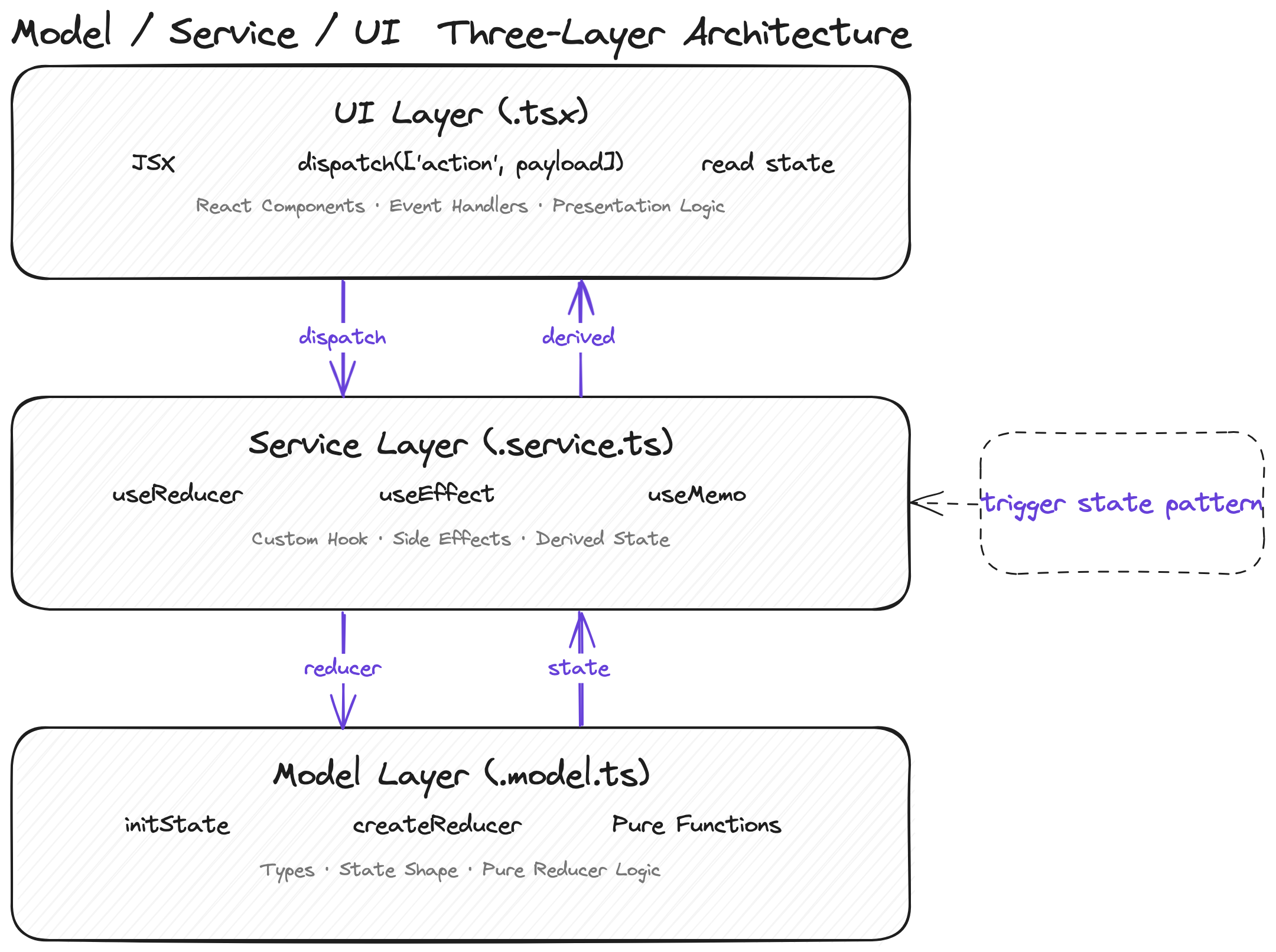
Our answer wasn’t to invent a new state management library. It was to define an architectural pattern so that AI knows exactly where each piece of code belongs and what it should look like.
The Foundation: createReducer
First, our custom createReducer hook — the type-system backbone of the entire architecture:
1
2
3
4
5
6
7
8
9
10
11
12
13
14
15
16
17
18
19
20
21
22
23
24
25
26
27
28
29
30
31
32
33
34
35
36
37
38
39
40
41
42
43
44
45
46
// shared/create-reducer.ts
import { Draft, produce } from 'immer';

type MapReducerAction<S, T> =
  T extends Record<infer K, (state: S, payload: any) => S>
    ? K extends keyof T
      ? Parameters<T[K]>[1] extends undefined
        ? [K]
        : [K, Parameters<T[K]>[1]]
      : unknown
    : unknown;

export function createReducer<S = unknown>() {
  function createReducer<
    RO extends Record<string, (state: S, payload: any) => S>
  >(reducerObject: RO) {
    function reducer(state: S, action: MapReducerAction<S, RO>) {
      const actionHandle = reducerObject[action[0]];
      if (typeof actionHandle === 'function') {
        return actionHandle(state, action[1]);
      }
      return state;
    }
    return reducer;
  }
  return createReducer;
}

// Immer version, supports mutable draft style
export function createImmerReducer<S = unknown>() {
  function createReducer<
    RO extends Record<string, (state: Draft<S>, payload: any) => any>
  >(reducerObject: RO) {
    function reducer(state: S, action: MapReducerAction<any, RO>) {
      const actionHandle = reducerObject[action[0]];
      if (typeof actionHandle === 'function') {
        return produce(state, (draft) => {
          actionHandle(draft, action[1]);
        });
      }
      return state;
    }
    return createReducer;
  }
  return createReducer;
}
The key design is double currying: createReducer<StateType>()(actions) — the first call locks in the state type, the second call passes the action object. TypeScript fully infers types at every step, and both the action name and payload type get full autocomplete when dispatching.
The Three Layers
Model (.model.ts) — pure state + reducer logic
Defines the shape of state and all the ways to modify it. No side effects, no hooks, pure functions.
1
2
3
4
5
6
7
8
9
10
11
12
13
14
15
16
17
18
19
20
21
22
23
24
25
26
27
28
29
// email-auth.model.ts
export const initState = {
  email: '',
  code: '',
  isValidEmail: false,
  sending: false,
  authing: false,
  expired: null as number | null,
  sendCodeBody: null as null | { email: string; captcha: string },
};

export const emailAuthReducer = createReducer<typeof initState>()({
  'update-email': (state, email: string) => ({
    ...state,
    email,
    isValidEmail: /^[^\s@]+@[^\s@]+\.[^\s@]+$/.test(email),
  }),
  'send-code': (state) => ({
    ...state,
    sending: true,
    sendCodeBody: { email: state.email, captcha: state.captcha! },
  }),
  'success-send-code': (state) => ({
    ...state,
    sending: false,
    expired: Date.now() + 60000,
    sendCodeBody: null,
  }),
});
Service (.service.ts) — hooks + side effect orchestration
Connects the model via useReducer, and uses useEffect to watch trigger state and execute side effects.
1
2
3
4
5
6
7
8
9
10
11
12
13
14
15
// email-auth.service.ts
export function useEmailAuthService() {
  const [state, dispatch] = useReducer(emailAuthReducer, initState);

  // trigger state pattern: when sendCodeBody is non-null, fire the API call
  useEffect(() => {
    if (state.sendCodeBody !== null) {
      api.post('/auth/email/code', state.sendCodeBody)
        .then(() => dispatch(['success-send-code']))
        .catch(() => dispatch(['error-send-code']));
    }
  }, [state.sendCodeBody]);

  return { state, dispatch };
}
UI (.tsx) — pure rendering, consumes only state and dispatch
1
2
3
4
5
6
7
8
9
10
11
12
13
14
15
16
17
18
// email-auth-form.tsx
export function EmailAuthForm() {
  const { state, dispatch } = useEmailAuthService();
  return (
    <form>
      <TextField
        value={state.email}
        onChange={(e) => dispatch(['update-email', e.target.value])}
      />
      <Button
        disabled={!state.isValidEmail || state.sending}
        onClick={() => dispatch(['send-code'])}
      >
        {state.sending ? 'Sending...' : 'Send Code'}
      </Button>
    </form>
  );
}
Why This Is AI-Friendly
The key is that each layer has crystal-clear responsibility boundaries:
| Layer | File suffix | Allowed | Prohibited |
|---|---|---|---|
| Model | .model.ts | State types, initial values, reducer | hooks, API calls, JSX |
| Service | .service.ts | useReducer, useEffect, API calls | JSX, DOM manipulation |
| UI | .tsx | JSX, dispatch calls, reading state | Directly mutating state, API calls |
When you write this table into your CLAUDE.md or cursor rules, AI has a clear decision framework. It no longer needs to guess “where does this logic belong,” because the rules already tell it.
Another critical design is the trigger state pattern: the model uses a body object (like sendCodeBody) as a “signal,” and the service uses useEffect to watch that signal and trigger side effects. This is much cleaner than calling APIs directly in the UI layer or mixing async logic into the store — and AI only needs to learn one pattern to handle every async scenario.
createReducer: Letting the Type System Guide AI Generation
Three-layer separation solves the “where does the code go” problem, but there’s another: how does AI know how to write actions?
Traditional Redux/useReducer patterns dispatch { type: string, payload: any }. For AI, this is almost unconstrained — type is a string, payload is any, it can do whatever it wants.
1
2
3
4
5
// Traditional pattern: AI can write anything
dispatch({ type: 'UPDATE_EMAIL', payload: 'test@example.com' });
dispatch({ type: 'update-email', payload: { email: 'test@example.com' } });
dispatch({ type: 'setEmail', email: 'test@example.com' });
// Three styles, all valid, all different
Our createReducer replaces action objects with action tuples, and combined with TypeScript’s type inference, achieves complete compile-time constraints:
1
2
3
4
5
6
7
8
9
10
11
12
13
14
15
16
17
18
19
20
21
22
23
24
25
const reducer = createReducer<typeof initState>()({
  'update-email': (state, email: string) => ({ ...state, email }),
  'toggle-active': (state) => ({ ...state, active: !state.active }),
  'set-filters': (state, filters: { search: string; page: number }) => ({
    ...state,
    filters,
  }),
});

// ✅ Correct: IDE autocompletes action name, payload type is inferred
dispatch(['update-email', 'test@example.com']);
dispatch(['toggle-active']);
dispatch(['set-filters', { search: 'react', page: 1 }]);

// ❌ Compile error: action name doesn't exist
dispatch(['unknown-action']);

// ❌ Compile error: payload type mismatch
dispatch(['update-email', 123]);

// ❌ Compile error: missing required payload
dispatch(['set-filters']);

// ❌ Compile error: action that takes no payload received one
dispatch(['toggle-active', true]);
What does this mean? When AI generates code, the TypeScript compiler itself acts as a guardrail. Even if AI writes the wrong action name or passes the wrong payload type, the IDE immediately flags it, and AI agents (like Claude Code) will self-correct in the next iteration.
More importantly: IDE autocomplete. When AI types dispatch([, the IDE surfaces all available action names. Once an action is selected, the payload type hint appears automatically. This essentially turns AI’s “free-form composition” into “selecting from a menu” — and AI’s accuracy when selecting from a menu is far higher than when creating freely.
Here’s how the options compare on type constraint strength:
| Approach | Action constraints | Payload constraints | IDE completion | AI generation accuracy |
|---|---|---|---|---|
| Zustand | None (free functions) | None | Fair | Low |
| Jotai | None (direct atom set) | Yes (atom type) | Good | Medium |
| Redux Toolkit | Yes (createSlice) | Yes | Good | Medium-high |
| createReducer tuple | Strong (enumerated names) | Strong (per-action types) | Precise | High |
Redux Toolkit’s createSlice is actually in a similar direction — it also constrains actions through structure. But RTK carries more boilerplate (slice, selector, thunk), and actions are still { type, payload } objects with a longer type inference chain. Our tuple approach is lighter and more direct in type inference.
A note for ReScript/OCaml users: If you’re familiar with ReScript, you might recognize that this is essentially an approximation of variant types + exhaustive pattern matching in TypeScript. ReScript’s
switchnatively handles action exhaustiveness and payload type checking — which validates the idea of “using type constraints to guide code generation” from another angle. The difference is we don’t need to switch languages — 30 lines of TypeScript gets you 80% of the constraint power.
Benchmark: Same Task, Four Architectures, How Does AI Do?
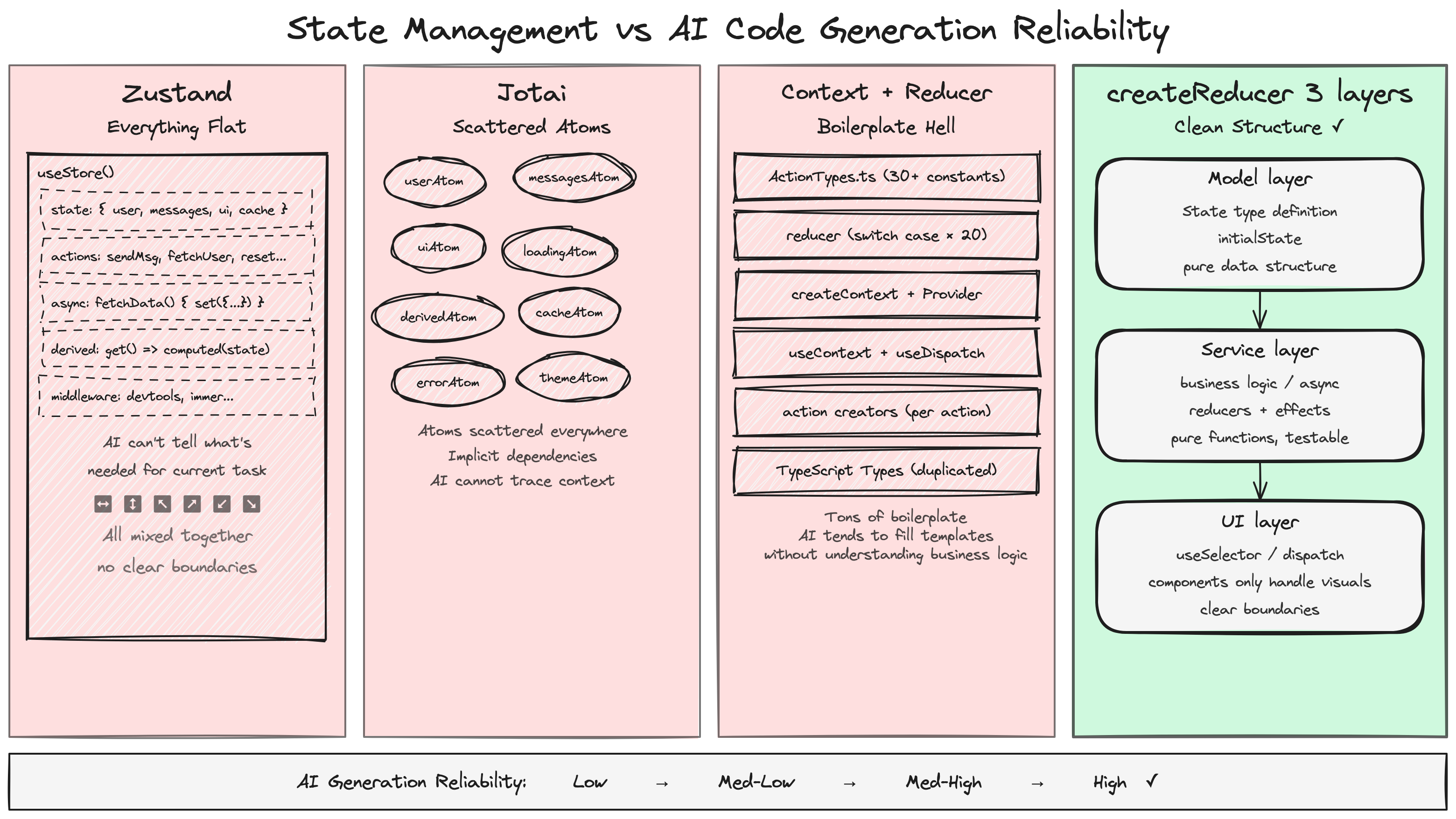
Theory only goes so far — let’s look at actual results. We designed a unified task and asked AI (Claude Sonnet 4) to generate code using four different state management approaches, keeping every prompt condition identical except for the specified library.
The Task
Implement a user list page component with the following features:
- Search input: filter results in real-time as the user types
- Pagination: 10 items per page, with previous/next navigation
- Sorting: click column headers to sort by name or email
- Loading state: show a loading indicator during requests
- Error handling: display an error message on failure with a retry option
Below is the actual AI-generated code (showing only the core state management portions; full code in the appendix).
Option A: Zustand — 377 lines, everything flat
1
2
3
4
5
6
7
8
9
10
11
12
13
14
15
16
17
18
19
20
21
22
23
24
25
26
27
28
29
30
31
32
33
34
35
36
37
38
39
40
41
42
43
const useUserStore = create<UserStore>((set, get) => ({
  users: [],
  loading: false,
  error: null,
  searchQuery: '',
  currentPage: 1,
  pageSize: 10,
  sortField: 'name',
  sortDirection: 'asc',

  fetchUsers: async () => {
    set({ loading: true, error: null });
    try {
      const users = await api.getUsers();
      set({ users, loading: false });
    } catch (err) {
      set({ error: err instanceof Error ? err.message : 'Failed to fetch users', loading: false });
    }
  },

  setSearchQuery: (query: string) => {
    set({ searchQuery: query, currentPage: 1 });
  },

  setSortField: (field: SortField) => {
    const { sortField, sortDirection } = get();
    if (sortField === field) {
      set({ sortDirection: sortDirection === 'asc' ? 'desc' : 'asc' });
    } else {
      set({ sortField: field, sortDirection: 'asc' });
    }
  },

  // Derived data hanging off the store as methods
  getFilteredSortedUsers: () => {
    const { users, searchQuery, sortField, sortDirection } = get();
    return users
      .filter(u => u.name.toLowerCase().includes(searchQuery.toLowerCase()) || ...)
      .sort((a, b) => { /* ... */ });
  },
  getPaginatedUsers: () => { /* calls getFilteredSortedUsers() */ },
  getTotalPages: () => { /* calls getFilteredSortedUsers() */ },
}));
Problems exposed:
- State, actions, async logic, and derived computations all mixed into one object — no layering whatsoever
- Derived data (
getFilteredSortedUsers) is a method on the store that recomputes on every call — no memoization getFilteredSortedUsersis called separately by bothgetPaginatedUsersandgetTotalPages— a full filter + sort happens twice in the same render frame- The UI component is also one 377-line function with no decomposition
Option B: Jotai — 285 lines, atoms scattered
1
2
3
4
5
6
7
8
9
10
11
12
13
14
15
16
17
// 7 base atoms
const usersAtom = atom<User[]>([]);
const loadingAtom = atom<boolean>(false);
const errorAtom = atom<string | null>(null);
const searchAtom = atom('');
const currentPageAtom = atom<number>(1);
const sortFieldAtom = atom<SortField>('name');
const sortDirectionAtom = atom<SortDirection>('asc');

// 3 derived atoms
const filteredSortedUsersAtom = atom((get) => {
  const users = get(usersAtom);
  const search = get(searchAtom).toLowerCase().trim();
  /* filter + sort ... */
});
const totalPagesAtom = atom((get) => { /* ... */ });
const pagedUsersAtom = atom((get) => { /* ... */ });
Problems exposed:
- 10 atoms scattered at the top of the file — and this is just a simple list page; atom count explodes for complex features
- AI wrote
fetchUsersas a plain async function inside the component rather than a write atom — showing AI’s grip on Jotai’s async patterns is unstable - 7
useAtomcalls lined up in the component; any atom change triggers a full re-render handleSortneeds to callsetSortFieldthensetSortDirection— two separate atom updates that can cause an intermediate render state
Option C: Context + useReducer — 407 lines, heaviest boilerplate
1
2
3
4
5
6
7
8
9
10
11
12
13
14
15
16
17
18
19
20
21
22
23
24
25
26
27
28
29
30
31
32
33
type Action =
  | { type: 'FETCH_START' }
  | { type: 'FETCH_SUCCESS'; payload: User[] }
  | { type: 'FETCH_ERROR'; payload: string }
  | { type: 'SET_SEARCH'; payload: string }
  | { type: 'SET_PAGE'; payload: number }
  | { type: 'SET_SORT'; payload: SortField };

function reducer(state: State, action: Action): State {
  switch (action.type) {
    case 'FETCH_START': return { ...state, loading: true, error: null };
    case 'FETCH_SUCCESS': return { ...state, loading: false, users: action.payload };
    /* ... 6 cases */
  }
}

const UserListContext = createContext<ContextValue | null>(null);

function useUserListContext(): ContextValue {
  const ctx = useContext(UserListContext);
  if (!ctx) throw new Error('useUserListContext must be used within UserListProvider');
  return ctx;
}

export function UserListProvider({ children }: { children: React.ReactNode }) {
  const [state, dispatch] = useReducer(reducer, initialState);
  /* side effects, derived data computation */
  return (
    <UserListContext.Provider value=>
      {children}
    </UserListContext.Provider>
  );
}
Strengths and problems:
- ✅ Right direction: the Action union type provides type constraints, the reducer is a pure function, and the UI is split into 6 sub-components (LoadingSpinner, ErrorMessage, UserTable, Pagination, etc.)
- ❌ Too much boilerplate: Action union type + switch cases + createContext + Provider + useContext hook + null check… the “plumbing” code alone accounts for ~40%
- ❌ AI generated 407 lines — the most of any approach — and more code means more chances for mistakes
Option D: createReducer + three-layer separation — 333 lines, clearest structure
1
2
3
4
5
6
7
8
9
10
11
12
13
14
15
16
17
18
19
20
21
22
23
24
25
26
27
28
29
30
31
32
33
34
35
36
37
38
39
40
41
42
43
44
45
46
47
48
49
50
51
52
53
54
55
56
57
58
59
60
61
62
63
64
65
66
67
68
69
// ===== MODEL LAYER (user-list.model.ts) =====
const initState: UserListState = {
  users: [],
  loading: false,
  error: null,
  search: '',
  page: 1,
  pageSize: 10,
  sortField: 'name',
  sortDirection: 'asc',
  fetchBody: { timestamp: Date.now() }, // trigger state: non-null triggers request
};

const userListReducer = createReducer<UserListState>()({
  setSearch: (state, search: string) => ({ ...state, search, page: 1 }),
  setPage: (state, page: number) => ({ ...state, page }),
  setSort: (state, field: SortField) => ({
    ...state,
    sortField: field,
    sortDirection: state.sortField === field && state.sortDirection === 'asc' ? 'desc' : 'asc',
    page: 1,
  }),
  fetchStart: (state) => ({ ...state, loading: true, error: null }),
  fetchSuccess: (state, users: User[]) => ({ ...state, loading: false, users, error: null }),
  fetchError: (state, error: string) => ({ ...state, loading: false, error }),
  retry: (state) => ({ ...state, fetchBody: { timestamp: Date.now() } }),
});

// ===== SERVICE LAYER (user-list.service.ts) =====
function useUserListService() {
  const [state, dispatch] = useReducer(userListReducer, initState);

  // trigger state pattern: fetchBody change triggers the request
  useEffect(() => {
    if (!state.fetchBody) return;
    dispatch(['fetchStart', undefined]);
    let cancelled = false;
    api.getUsers()
      .then(users => { if (!cancelled) dispatch(['fetchSuccess', users]); })
      .catch(err => { if (!cancelled) dispatch(['fetchError', err.message]); });
    return () => { cancelled = true; };
  }, [state.fetchBody]);

  const derived = useMemo(() => {
    // filter → sort → paginate, all derived data in one useMemo
    const filtered = state.users.filter(/* ... */);
    const sorted = [...filtered].sort(/* ... */);
    const paginated = sorted.slice(/* ... */);
    return { filteredAndSorted: sorted, paginated, totalPages };
  }, [state]);

  return { state, derived, dispatch };
}

// ===== UI LAYER (user-list.tsx) =====
function UserListPage() {
  const { state, derived, dispatch } = useUserListService();
  // Pure rendering: only reads state/derived, only calls dispatch
  return (
    <div>
      <input value={state.search} onChange={e => dispatch(['setSearch', e.target.value])} />
      {state.loading && <span>Loading...</span>}
      {state.error && <button onClick={() => dispatch(['retry', undefined])}>Retry</button>}
      <table>/* render using derived.paginated */</table>
      <button onClick={() => dispatch(['setPage', state.page - 1])}>Previous</button>
      <button onClick={() => dispatch(['setPage', state.page + 1])}>Next</button>
    </div>
  );
}
Strengths:
- ✅ Three-layer separation strictly enforced: Model layer is pure state with no side effects, Service layer orchestrates side effects + derived computation, UI layer is pure rendering
- ✅ AI spontaneously applied the trigger state pattern (
fetchBodyas a signal) and included request cancellation logic (cancelledflag) on its own - ✅ Derived data computed in a single
useMemo— no redundant computation like the Zustand version - ❌ AI generated a redundant
userListReducerObject(duplicating reducer logic for type extraction) — showing that whilecreateReducer’s type inference is strong, AI occasionally doesn’t fully trust it
Comparison Scorecard
Based on actual AI-generated code, scored across 5 dimensions:
| Dimension | Zustand | Jotai | Context+Reducer | createReducer three-layer |
|---|---|---|---|---|
| Type safety | 6 — store methods have no action constraints | 7 — atoms are typed but set is free | 8 — Action union provides constraints | 9 — tuple gives full compile-time validation |
| Separation of concerns | 3 — everything flat in one object | 5 — atoms are split but no layering | 7 — Provider provides separation | 9 — strict model/service/ui three layers |
| Derived data handling | 4 — no memoization, redundant computation | 8 — derived atoms auto-cache | 6 — manual computation inside Provider | 8 — unified useMemo computation |
| Line count | 377 | 285 | 407 | 333 |
| AI generation reliability | Medium — style unpredictable | Medium-low — async patterns unstable | Medium-high — structure correct but verbose | High — architectural constraints produce stable output |
Conclusion: there’s no perfect solution, but the stronger the constraints, the more controllable the AI output.
Jotai’s derived atom mechanism is the most elegant, but AI’s command of its async patterns is shaky. Context+Reducer points in the right direction but drowns in boilerplate. The createReducer three-layer approach has its own imperfections (AI generated some redundant code), but the structural constraints of three-layer separation make AI output the most consistent and predictable — which is the most important metric in the age of AI.
Practical Guide: How to Adopt This in Your Project
You don’t need to rewrite your entire project.
Step 1: Use the new pattern for new features
For the next feature that needs state management, write it with the model/service/ui three-layer approach. The migration cost for a single feature is low, but it’s enough for the team to feel the difference.
1
2
3
4
src/features/user-list/
├── user-list.model.ts    # state + reducer
├── user-list.service.ts  # hooks + side effects
└── user-list.tsx          # UI component
Step 2: Copy createReducer
createReducer is only 30 lines with zero dependencies (the Immer version requires immer). Copy it directly into your project:
1
2
3
// shared/create-reducer.ts — full code in section 3 of this post
export function createReducer<S = unknown>() { /* ... */ }
export function createImmerReducer<S = unknown>() { /* ... */ }
Step 3: Write clear rules — this is the most critical step
Explicitly document the architectural rules in your CLAUDE.md, .cursorrules, or project docs:
1
2
3
4
5
6
7
8
9
## State Management Guidelines

All feature modules that require state management must use model/service/ui three-layer separation:

- **Model** (`.model.ts`): Define initState and reducer (using createReducer), pure functions, no hooks or API calls
- **Service** (`.service.ts`): useReducer + useEffect for side effects, useMemo for derived data
- **UI** (`.tsx`): Pure rendering components, consume only state/dispatch, no direct API calls

For async operations, use the trigger state pattern: set a body object in the model as a signal, and have the service watch it via useEffect to execute the side effect.
The ROI on this documentation is remarkable — AI reads these rules before generating code each time, then writes to those rules. You define the rules once; AI executes them ten thousand times.
Step 4: Migrate incrementally, don’t big-bang it
There’s no need to migrate your existing Zustand/Jotai code all at once. It still works fine. Just adopt the new pattern for new features and refactors, and let the project transition naturally.
Constraints Are Productivity
The way we evaluate state management libraries is changing.
For the past decade, we’ve measured libraries by DX (Developer Experience) — is the API clean, is the learning curve gentle, is the boilerplate minimal. Zustand and Jotai are near-perfect on this dimension.
But the AI era introduces a new dimension: AI-X (AI Experience) — can AI reliably produce high-quality code within this architecture.
These two dimensions aren’t in conflict. Good constraints don’t make the human experience worse — three-layer separation makes code easier to understand and maintain, and typed reducers make refactoring safer. It just turns “good practices” from “suggestions” into “rules.”
Constraints aren’t limitations — they’re productivity.
Try using model/service/ui separation for your next feature and see whether AI-generated code is easier to accept without changes. If you have similar experiences or a different perspective, share it in the comments.